Turn conversations into business outcomes

AI Agents that take action - not just give answers

An Agent is not a chatbot. It picks up a conversation, then completes the work - books the appointment, captures the application, opens the ticket, takes the order, files the claim - using Connectors to act on the apps you already run. Every Agent has its own instructions, its own Connectors, and its own handoff rules.

Official WhatsApp Business API Meta Tech Partner
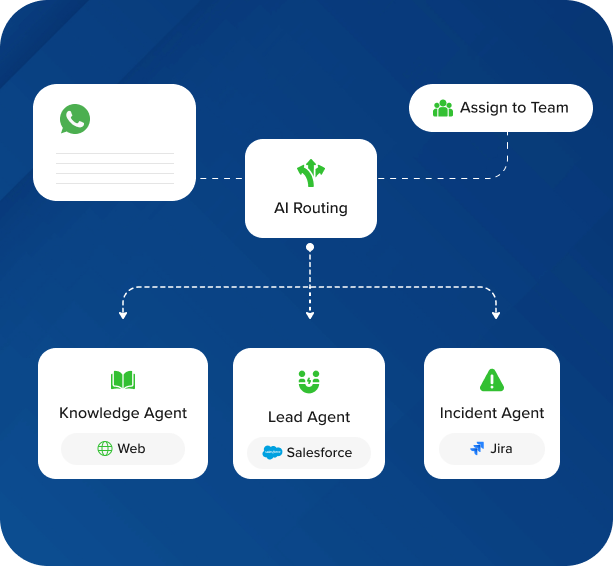
AI routing diagram showing one WhatsApp conversation routed to Knowledge, Lead, and Incident agents, with human team fallback.

Orchestration

Many Agents, Smart routing

Customers do not see how many Agents you run behind the scenes. They message your one WhatsApp number. Sawabot reads the intent, matches it against each Agent's routing guidelines, and picks the best fit - or escalates to your team when none of them apply.

Add a new Agent and it joins the routing. Retire one and conversations move elsewhere. Nothing customer-facing has to change.

Three kinds of Agents

Knowledge, External apps, Your systems

All three are Agents. What changes between them is what they connect to - your documents, the apps your team already uses, or the proprietary systems only your company runs.

Knowledge Agent

The built-in Knowledge Agent

Every Sawabot workspace ships with a Knowledge Agent. Upload your documents - brochures, policies, SOPs, service sheets - or connect a website, and the Knowledge Agent answers customer questions with a source citation. No Connectors to configure.

Powered by AI Search .
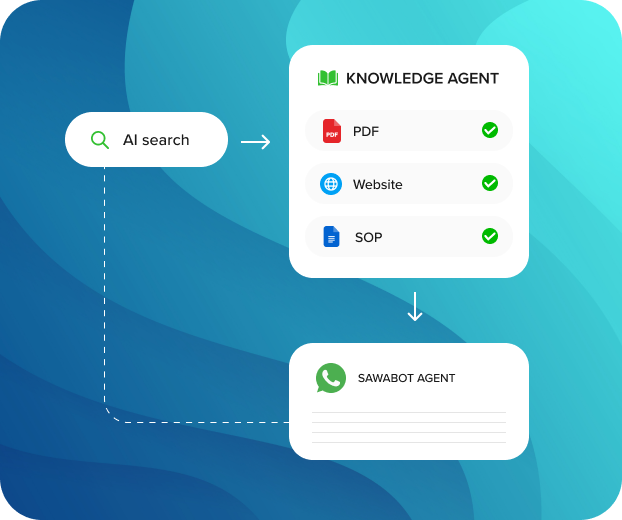
Knowledge Agent diagram connected to AI Search, PDF, Website, SOP, and a sourced WhatsApp answer.
External apps

Agents that act on the apps you already use

Configure an Agent to use Sawabot's built-in Connectors - WhatsApp, Messenger, Instagram, Telegram, Google Calendar, HubSpot, Zoho, Odoo, Calendly, Gmail, Google Sheets, Zoho Desk, Zendesk, Freshdesk, and more. One Agent can use several Connectors at once.

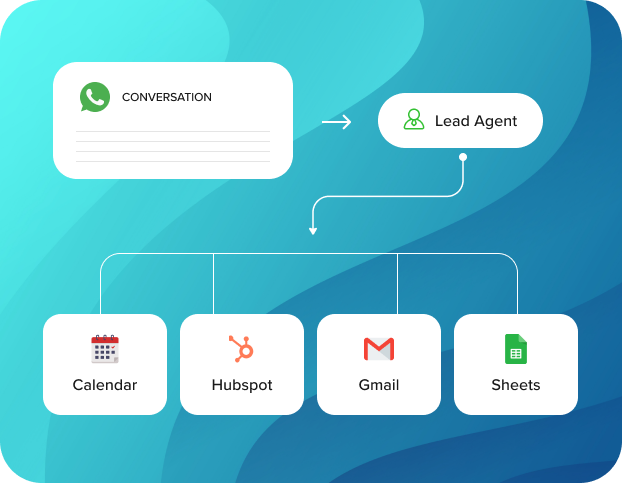
Lead Agent diagram connected from WhatsApp to Calendar, HubSpot, Gmail, and Sheets.

Example - a Lead Agent that qualifies a prospect, books the call, and updates your CRM, all from one WhatsApp conversation.

Your systems

Agents that act on your internal systems

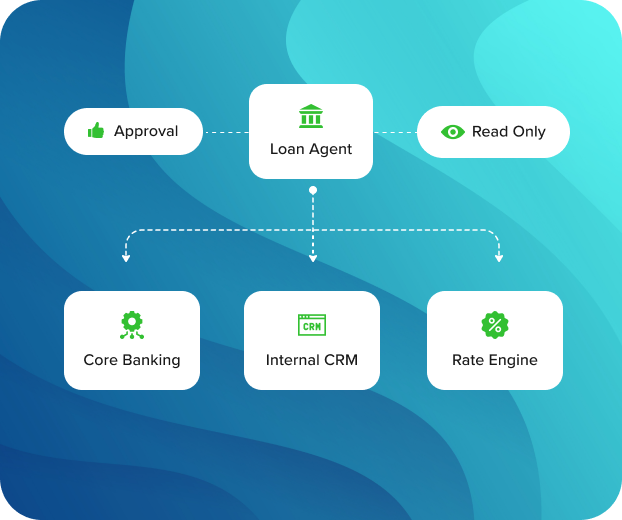
For the proprietary systems only your company runs - core banking, internal CRM, rate engine, scheduling backend, custom HR - your team exposes the system and the Agent uses it through a custom Connector. Read-only by default; sensitive actions can require approval.

Loan Agent diagram connected to core banking, internal CRM, and rate engine, with read-only and approval controls.

Example - a Loan Agent that checks eligibility against your core banking system and routes the application to an officer. Technical details on Connectors .

Anatomy of an agent

Four properties chatbots do not have

Every Agent in Sawabot carries these four properties. They are the line between a chatbot that replies and an Agent that takes action.

Guideline-based routing

Each Agent has its own routing guidelines. Sawabot matches the conversation and picks the right Agent.

Agent instructions

Each Agent has its own instructions - tone, what it is allowed to do, what to escalate, and what never to say.

Own Connectors

Each Agent connects only to the documents, apps, or systems it needs. No Agent sees more than it should.

Handoff rules

When the Agent cannot or should not handle a request, it escalates to your team with the full context.

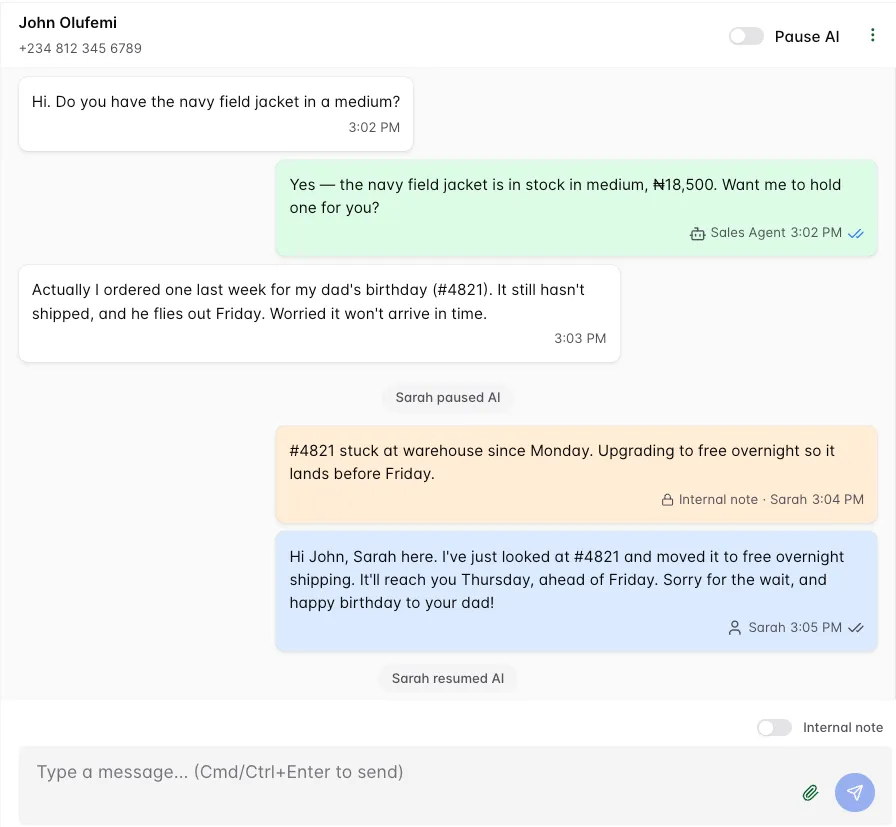
Sawabot inbox showing an operator taking over a WhatsApp conversation.

Inbox

Your team handles the edge cases, The agent handles the routine

The agent works beside your team, not instead of them. Operators can step into any thread, pause the agent, leave internal notes, and hand the conversation back when the human part is done.

Take over any conversation

An operator can reply directly while the customer stays in the same WhatsApp thread.

Pause or resume the agent

Pause one conversation, a segment, or the whole workspace when needed.

Add internal notes

Keep operator context separate from what the customer sees.

Separate roles

Owner, Admin, Operator, and Reader roles keep setup, billing, operation, and review separate.

Demo

Plan your WhatsApp AI rollout

Map the first workflows, handoff rules, systems, and governance controls your team needs before deploying AI in customer conversations.